Product Design Documentation Product Design Wiki | 00 Global Patterns |
|---|---|
Global Primary Navigation | |
Global Header | |
01 Home | |
| |
02 All Shows | |
| |
03 Games | |
04 DCOM | |
05 On Now (More) | |
| |
06 Players | |
07 Detail Views | |
08 Profile | |
| |
09 Settings | |
| |
10 Authentication | |
| |
11 Search | |
| |
12 Chromecast | |
| |
13 Messages | |
| |
14 Tokens | |
| |
15 Pins | |
| |
If needed: APPROVED DESIGN REVIEW APPROVED
Table of Contents
Sounds are by Man Made Music
How to add a sound to this page:
- Enter Edit Mode
- Drag and drop from your computer to this Confluence page in your browser. Files will upload to the page.
- Insert the multimedia macro (short cut use { and type) in the appropriate table cell and select your new sound file in the drop down
- Save and it should appear in the cell.
All DisneyNOW
All DisneyNOW | Sound File | |
|---|---|---|
1 | All Shows Compulsive | |
2 | Authentication Intro | |
3 | Category | |
4 | DCOM Compulsive | |
5 | Favorite | |
6 | Games Compulsive | |
7 | Home Compulsive | |
8 | Launch Transition | |
9 | magicfx_profilesuccess | |
10 | Menu Pull-Down | |
11 | Mickey Animation | |
12 | More Compulsive | |
13 | Nav Focus | |
14 | Nav Main Focus | |
15 | On Now Compulsive | |
16 | Profile Bed | |
17 | Profile Intro | |
18 | Select | |
19 | Special Select | |
20 | Unfavorite |
Age Collection
Rewards
Version 1 - September 2018
| Name | Sound File | |
|---|---|---|
| 1 | Token | |
| 2 | Vending Machine |
Version 2 - October 2018
| Name | File | |
|---|---|---|
| 1 | Coin Rev 1 | |
| 2 | Vending Machine Rev 1 | |
| 3 | Vending Machine Rev 2 |
Note: Web works differently than the devices. Henry, who is the engineering lead for web. He will walk us through how to check all of the copy use cases on web.
App Copy Source of Truth Spreadsheet: https://docs.google.com/spreadsheets/d/1sA0XLqpDvaSDgsjyimyZhWNnZWEyCp1pdkmHwKHpTPU/edit?usp=sharing
PROD Environment
http://api.config.watchabc.go.com/appsconfig/prod/disneyv2/iosphone/en-us/messages.json
http://api.config.watchabc.go.com/appsconfig/prod/disneyv2/iostablet/en-us/messages.json
http://api.config.watchabc.go.com/appsconfig/prod/disneyv2/tvos/en-us/messages.json
http://api.config.watchabc.go.com/appsconfig/prod/disneyv2/androidphone/en-us/messages.json
http://api.config.watchabc.go.com/appsconfig/prod/disneyv2/androidtablet/en-us/messages.json
http://api.config.watchabc.go.com/appsconfig/prod/disneyv2/androidtv/en-us/messages.json
http://api.config.watchabc.go.com/appsconfig/prod/disneyv2/firetv/en-us/messages.json
http://api.config.watchabc.go.com/appsconfig/prod/disneyv2/roku/en-us/messages.json
http://api.config.watchabc.go.com/appsconfig/prod/disneyv2/kindle/en-us/messages.json (for phone and tablet)
QA Environment
http://api.config.watchabc.go.com/appsconfig/qa/disneyv2/iosphone/en-us/messages.json
http://api.config.watchabc.go.com/appsconfig/qa/disneyv2/iostablet/en-us/messages.json
http://api.config.watchabc.go.com/appsconfig/qa/disneyv2/tvos/en-us/messages.json
http://api.config.watchabc.go.com/appsconfig/qa/disneyv2/androidphone/en-us/messages.json
http://api.config.watchabc.go.com/appsconfig/qa/disneyv2/androidtablet/en-us/messages.json
http://api.config.watchabc.go.com/appsconfig/qa/disneyv2/androidtv/en-us/messages.json
http://api.config.watchabc.go.com/appsconfig/qa/disneyv2/firetv/en-us/messages.json
http://api.config.watchabc.go.com/appsconfig/qa/disneyv2/roku/en-us/messages.json
http://api.config.watchabc.go.com/appsconfig/qa/disneyv2/kindle/en-us/messages.json (for phone and tablet)
| Title | Designer | Developers | Document owner | Document status | Epic | Product Manager | QA | Sponsor | Target release |
|---|---|---|---|---|---|---|---|---|---|
| Programming | DRAFT | Leland Weeks | Danyel Mendoza |
Splash screen should always play fully on app launch.
| Feature Product Manager | |
| UX | Rona Sheen |
| VisD |
See also Carousel Usability & User Experience Research.
Related Discussions
- 10/15/2018 - David Avery, Jason White, and Courtney presented Immersive and with Peeks Hero Carousel concepts at the monthly DNOW data meeting to Programming team. Programming liked the Immersive concept and Robin Campbell also liked that it kept the 16:9 asset deliverables. The peeks concept would have needed new asset size delivery.
- 10/16/2018 - Rona, Courtney, David - Ad-hoc check-in about Keep Playing tray. That tray currently flows off the screen rather than stacking in a grid. With the new hero carousel, on LARGE breakpoints, the Keep Playing section will also flow into the grid so all tiles fit into the fixed width. SMALL and MEDIUM breakpoints will continue to have Keep Playing flow off the screen.
- Spring 2019 - Jason White made a prototype for web. David/Rona working on cross-platform hero carousel designs.
- Roku devs prototyping. PNG sequence works for WATCH NOW button
Mobile Phone and Tablet
|
|
| Mobile | Tablet |


Web
|
|
|
|
| Small - Mobile Browser Touchscreen | Small - Desktop Browser | Medium | Large |


Connected TV Devices
 |  |  |
|
| Roku / Fire TV / Android TV - Hero Not Focused | Roku / Fire TV / Android TV - Hero Focused | tvOS - Hero Not Focused | tvOS - Hero Focused |

Button Mapping for TV Remotes
2018 Design Work


tvOS
Roku Technical Design Constraints
- The enlarging of the slide when its in focus will most likely run us into similar issues as when we apply the enlarging of content thumbnails
- Images don't scale up well on Roku making them gritty on HD and SD screens and we can't enable a native focus state when we try to combine enlarging and border effect—its either one or the other
- A good example of an app that has a slideshow that feels great (native focus) is STARZ has almost the same look your going for just different aspect ratio for the slide images

FireTV

Across all platforms, the Faves tile tray on Home is a carousel like Continue Watching.
When DisneyNOW first launched in 2017, the Faves tiles stacked in rows instead of being in a horizontally scrolling tile tray (with the exception of TV platforms).
In 2019, in order to test if users will better discover lower tile trays on the Home screen, DisneyNOW is implementing it in a carousel form instead. Details in https://jira.disney.com/browse/DCWW-1078
Mobile App Example

Change Log
03/02/2020 - Updated Roku logic diagram
02/25/2020 - Revisited diagram for Roku
10/29/2019 - Web flow diagram updated for tokens feature. Universal diagram that can be applied cross-platform is still WIP.
7/16/2019 - Latest Mobile flow diagram reviewed with Brandon Rude
Table of Contents
Types of Prompts or Messaging Possible from Home
Note: Home screen should load first before prompts happen
- Permissions for external storage (Android-only)
- Tokens Intro (or any type of new feature intro like Pins later)
- Emoji Wink (All platforms except for Web, Roku)
- Check Out Profile Coach Mark
- Games Coach Mark on Home
- Birthday Prompt or Birthday Surprise
- [FUTURE] Pin Earned Fanfare - if user met requirements to earn a pin and then backgrounded the app prior to the fanfare. If the app refreshes while backgrounded
- Daily Surprise
- Yesterday's Tokens Sheet Notification
Image References of Prompts
Permissions for external storage (Android Only) | Emoji Wink | Feature Intro (Ex: Tokens Intro) | Check Out Profile Coach Mark | Games Coach Mark on Home (if applicable) |
|---|---|---|---|---|
User gets the DNOW modal first then the system dialog. | (image to be uploaded) |  |
Req: https://jira.disney.com/browse/IOSDISNOW-4504 "The coach mark displays the first time a profile launches with the Rewards feature. The coach mark does not display on subsequent launches of the profile." |
Requirement: https://jira.disney.com/browse/IOSDISNOW-4552 Tokens Intro and Coach Marks - May 2019
|


| Birthday Prompt or Birthday Surprise | Pin Earned Fanfare | Daily Surprise | Yesterday's Tokens Sheet Notification |
|---|---|---|---|
|
If user met requirements to earn a pin and then backgrounded the app prior to the fanfare. If the app refreshes while backgrounded |
|
|


General Hierarchy – If timers happen at the same time, follow this hierarchy
- Permissions for external storage (Android Only)
- Birthday Prompt or Surprise
- Pin Earned Fanfare (future)
- Tokens/Feature Intro
- Emoji Wink
- Daily Surprise
- Games Coach Mark on Home
- Yesterday's Tokens sheet notification (plan to retire in July when Daily Surprise releases)
Note: Easter Eggs animations should not display over prompts/messaging
Flow Chart for Display Order
MOBILE Last Update 07/16/2019/2019 | Roku Last 02/25/2020 | WEB Last updated 10/28/2019 |
|---|---|---|
Click to expand
| Click to expand  | Click to expand
|


In Words
| New Profiles Flows | Existing Profile Flows |
|---|---|
First Home Visit after Profile Onboarding Success or Profile Onboarding Skip
Second Home Visit If user has not received Starter Pin by exploring MY PINS yet:
If user has already received Starter Pin by exploring MY PINS:
Third Home Visit – If user received Starter Pin in second home visit
| After Pins first launches: First Visit to Home when Pins Launches
Second Visit to Home when Pins Launches
Any subsequent visits to Home on a new day
|
Older notes:
Rewards with Birthdate Collection
iOS is same as Android except for Permissions ask.
Android
|
|
|
 DISNEYANDROIDMOBILE-840


| Target release | Ready for release October (by Rewards) |
|---|---|
| Epic |
|
| Document Status | PM REVIEW |
| Product | |
| Interaction Design | |
| Visual Design | |
| Development | |
| EIA | |
| QA | |
| PMO |
Goals
- Provide easy access to what's see and watch what's On Now.
Tasks
- Create Web ticket(s) Adam Grandy
- Review other platforms and provide feedback (click through to Invision and leave comments, please... feel free to "approve" too) Adam Grandy
Background and strategic fit
We need to provide a location for On Now in the information architecture of the app as moving the emoji to the navigation will remove it from the More menu.
Design Assumptions
- On Now will remain in the navigation bar for tablet and TV platforms
User Requirements
| # | Feature Title | User Story Description | Importance | Notes |
|---|---|---|---|---|
| 1 | On Now Category | As a user, I would like to be able to see shows are On Now. | Must Have |
|
| 2 | Live Video Tiles | As a user, I would like to be able to tell the difference between regular video and what's live now. | Must Have |
|
User Research
Usability
| Target release | |
|---|---|
| Epic |
|
| Document Status | DRAFT |
| Product | |
| Interaction Design | |
| Visual Design | |
| Development | |
| EIA | |
| QA | |
| PMO |
Goals
Redesign the OnNow web experience to be full screen: http://disneynow.go.com/watch-live?brand=disney-junior
- Immersive playback experience
- Parity across DNow player elements
- Seamless navigation between Channels
- Constant awareness that this is a “Live” experience and “What’s On” now
- Constant awareness of location (global nav should be visible when not in full screen playback)
Existing engagement metrics should not drop.
Tasks
- Add paper prototype photos Angela Glass
- Wires for all platforms Jhillika Kumar
Background and strategic fit
Assumptions
UX Requirements
See Video Framework Product Requirements - OLD MASTER DOC.
| # | Feature Title | User Story Description | Importance | Notes |
|---|---|---|---|---|
| 1 | Player Controls (VOD) | As a user, I want player controls so that I can play, pause, fast forward and rewind the video | Must Have | |
| 2 | Closed Caption Button | As a user, I want a closed caption button so that I can turn captions on/off | Must Have | |
| 3 | Scrubbing Thumbnail | As a user, I want scrubbing thumbnails so I can keep track of my video position while scrubbing (ff/ rewinding) | Must Have | |
| 5 | Full Screen | As a user, I want a full screen button so that I can watch video in full screen | Must Have | |
| 6 | Exit Button | As a user, I want an exit button so that I have a way to exit full screen video playback | Must Have | |
| 8 | Episode/ Show /Season Titles (Metadata) | As a user I want episode metadata so that I know what Show/ Season and Episode I am watching (Show Title, Episode Title/ #, Season #) | Must Have | |
| 9 | Episode/ Show Description (Metadata) | As a user, I want a description of the episode/show I am watching so that I know what the episode/show is about | Must Have | |
| 10 | Ad Markers (Ad pods) | As a user, I want ad markers so that I know whenever an ad break is coming up | Must Have | |
| 11 | Channel Selection (Live) | As a user I want Channel options so that I can navigate to different channels during playback | Must Have | |
| 12 | Loading Icon | As a user I want a loading icon so I know when my content is loading | Must Have | |
| 13 | Current Channel Reference (Live) | As a user I want a Current Channel reference so that I know what channel I'm watching at all times | Must Have | |
| 14 | Casting | As a user I want a casting button so that I can cast the video that I'm watching | Must Have |
User Research
User Experience Design

Mobile Design
iOS
Flows
| Description | User Story I | User Story II | User Story III |
|---|---|---|---|
Wires |
|
|
|
Comps |
Android
Flows
| Description | User Story I | User Story II | User Story III |
|---|---|---|---|
Wires |
|
|
|
Comps |
Web Design
Small
Flows
| Description | User Story I | User Story II | User Story III |
|---|---|---|---|
Wires |
|
|
|
Comps |
Medium
Flows
| Description | User Story I | User Story II | User Story III |
|---|---|---|---|
Wires |
|
|
|
Comps |
Large
Flows
| Description | User Story I | User Story II | User Story III |
|---|---|---|---|
Wires |
|
|
|
Comps |
Analytics
Questions
Below is a list of questions to be addressed as a result of this requirements document:
| Question | Outcome |
|---|---|
Not Doing
Usability
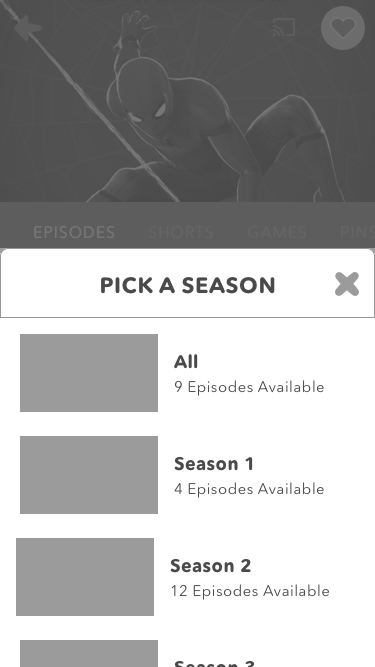
Show Details - Season Filter Exploration
After most of content goes to D+, only current season will be available on DisneyNOW though...
Season Dropdown | ||
|---|---|---|
|
|
|


| Target release | |
|---|---|
| Epic | |
| Document Status | DRAFT |
| Product | |
| Interaction Design | |
| Visual Design | |
| Development | |
| EIA | |
| QA | |
| PMO |
Goals
- Our app launched with the concept of switching your "profile" but no concept or realization in the user interface of what your "profile" is... we are adding "My Profile" for our personalization features.
Tasks
Background and strategic fit
Assumptions
Requirements
| # | Feature Title | User Story Description | Importance | Notes |
|---|---|---|---|---|
| 1 | ||||
| 2 | Birthday Collection |
| ||
| Profile Picker |
|
User Research
User Experience Design
Mobile Design
| Description | User Story 1 | User Story 2 | User Story 3 |
|---|---|---|---|
Sketches |
|||
Wires |
|
|
|
Comps |
iOS
Flows
| Description | User Story 1 | User Story 2 | User Story 3 |
|---|---|---|---|
Sketches |
|||
Wires |
|
|
|
Comps |
Android
Flows
| Description | User Story 1 | User Story 2 | User Story 3 |
|---|---|---|---|
Sketches |
|||
Wires |
|
|
|
Comps |
Web Design
Small
Flows
| Description | User Story 1 | User Story 2 | User Story 3 |
|---|---|---|---|
Sketches |
|||
Wires |
|
|
|
Comps |
Medium
Flows
| Description | User Story 1 | User Story 2 | User Story 3 |
|---|---|---|---|
Sketches |
|||
Wires |
|
|
|
Comps |
Large
Flows
| Description | User Story I | User Story II | User Story III |
|---|---|---|---|
Sketches |
|||
Wires |
|
|
|
Comps |
Tablet Design
| Description | User Story 1 | User Story 2 | User Story 3 |
|---|---|---|---|
Sketches |
|||
Wires |
|
|
|
Comps |
iOS
Flows
| Description | User Story 1 | User Story 2 | User Story 3 |
|---|---|---|---|
Sketches |
|||
Wires |
|
|
|
Comps |
Android
Flows
| Description | User Story 1 | User Story 2 | User Story 3 |
|---|---|---|---|
Sketches |
|||
Wires |
|
|
|
Comps |
TV Design
| Description | User Story 1 | User Story 2 | User Story 3 |
|---|---|---|---|
Sketches |
|||
Wires |
|
|
|
Comps |
tvOS
Flows
| Description | User Story 1 | User Story 2 | User Story 3 |
|---|---|---|---|
Sketches |
|||
Wires |
|
|
|
Comps |
Roku
Flows
| Description | User Story 1 | User Story 2 | User Story 3 |
|---|---|---|---|
Sketches |
|||
Wires |
|
|
|
Comps |
FireTV
Flows
| Description | User Story 1 | User Story 2 | User Story 3 |
|---|---|---|---|
Sketches |
|||
Wires |
|
|
|
Comps |
Android TV
Flows
| Description | User Story 1 | User Story 2 | User Story 3 |
|---|---|---|---|
Sketches |
|||
Wires |
|
|
|
Comps |
Analytics
Questions
Below is a list of questions to be addressed as a result of this requirements document:
| Question | Outcome |
|---|---|
Not Doing
Usability
| Target release | |
|---|---|
| Epic | |
| Document Status | DRAFT |
| Product | |
| Interaction Design | |
| Visual Design | |
| Development | |
| EIA | |
| QA | |
| PMO |
Goals
Tasks
Background and strategic fit
Assumptions
Requirements
| # | Feature Title | User Story Description | Importance | Notes |
|---|---|---|---|---|
| 1 | ||||
| 2 |
User Research
User Experience Design
Mobile Design
| Description | User Story 1 | User Story 2 | User Story 3 |
|---|---|---|---|
Sketches |
|||
Wires |
|
|
|
Comps |
iOS
Flows
| Description | User Story 1 | User Story 2 | User Story 3 |
|---|---|---|---|
Sketches |
|||
Wires |
|
|
|
Comps |
Android
Flows
| Description | User Story 1 | User Story 2 | User Story 3 |
|---|---|---|---|
Sketches |
|||
Wires |
|
|
|
Comps |
Web Design
Small
Flows
| Description | User Story 1 | User Story 2 | User Story 3 |
|---|---|---|---|
Sketches |
|||
Wires |
|
|
|
Comps |
Medium
Flows
| Description | User Story 1 | User Story 2 | User Story 3 |
|---|---|---|---|
Sketches |
|||
Wires |
|
|
|
Comps |
Large
Flows
| Description | User Story I | User Story II | User Story III |
|---|---|---|---|
Sketches |
|||
Wires |
|
|
|
Comps |
Tablet Design
| Description | User Story 1 | User Story 2 | User Story 3 |
|---|---|---|---|
Sketches |
|||
Wires |
|
|
|
Comps |
iOS
Flows
| Description | User Story 1 | User Story 2 | User Story 3 |
|---|---|---|---|
Sketches |
|||
Wires |
|
|
|
Comps |
Android
Flows
| Description | User Story 1 | User Story 2 | User Story 3 |
|---|---|---|---|
Sketches |
|||
Wires |
|
|
|
Comps |
TV Design
| Description | User Story 1 | User Story 2 | User Story 3 |
|---|---|---|---|
Sketches |
|||
Wires |
|
|
|
Comps |
tvOS
Flows
| Description | User Story 1 | User Story 2 | User Story 3 |
|---|---|---|---|
Sketches |
|||
Wires |
|
|
|
Comps |
Roku
Flows
| Description | User Story 1 | User Story 2 | User Story 3 |
|---|---|---|---|
Sketches |
|||
Wires |
|
|
|
Comps |
FireTV
Flows
| Description | User Story 1 | User Story 2 | User Story 3 |
|---|---|---|---|
Sketches |
|||
Wires |
|
|
|
Comps |
Android TV
Flows
| Description | User Story 1 | User Story 2 | User Story 3 |
|---|---|---|---|
Sketches |
|||
Wires |
|
|
|
Comps |
Analytics
Questions
Below is a list of questions to be addressed as a result of this requirements document:
| Question | Outcome |
|---|---|
Not Doing
Usability

| Target release | |
|---|---|
| Epic | |
| Document Status | DRAFT |
| Product | |
| Interaction Design | |
| Visual Design | |
| Development | |
| EIA | |
| QA | |
| PMO |
Goals
Tasks
Background and strategic fit
Assumptions
Requirements
| # | Feature Title | User Story Description | Importance | Notes |
|---|---|---|---|---|
| 1 | ||||
| 2 |
User Research
User Experience Design
Analytics
Questions
Below is a list of questions to be addressed as a result of this requirements document:
| Question | Outcome |
|---|---|
Not Doing
Usability
Chosen at profile creation, may be updated later.
- For Younger Kids — Disney Junior ONLY (default selection)
- For All Kids — All Networks
ONLY: Preferences concerned Disney Junior parents
ALL: Gives the user the chance to choose giving a feeling of getting "more".
Support recognition over recall with network logos.
| Target release | |
|---|---|
| Epic | |
| Document Status | DRAFT |
| Product | |
| Interaction Design | |
| Visual Design | |
| Development | |
| EIA | |
| QA | |
| PMO |
Goals
Tasks
Background and strategic fit
Assumptions
Requirements
| # | Feature Title | User Story Description | Importance | Notes |
|---|---|---|---|---|
| 1 | ||||
| 2 |
User Research
User Experience Design
Mobile Design
| Description | User Story 1 | User Story 2 | User Story 3 |
|---|---|---|---|
Sketches |
|||
Wires |
|
|
|
Comps |
iOS
Flows
| Description | User Story 1 | User Story 2 | User Story 3 |
|---|---|---|---|
Sketches |
|||
Wires |
|
|
|
Comps |
Android
Flows
| Description | User Story 1 | User Story 2 | User Story 3 |
|---|---|---|---|
Sketches |
|||
Wires |
|
|
|
Comps |
Web Design
Small
Flows
| Description | User Story 1 | User Story 2 | User Story 3 |
|---|---|---|---|
Sketches |
|||
Wires |
|
|
|
Comps |
Medium
Flows
| Description | User Story 1 | User Story 2 | User Story 3 |
|---|---|---|---|
Sketches |
|||
Wires |
|
|
|
Comps |
Large
Flows
| Description | User Story I | User Story II | User Story III |
|---|---|---|---|
Sketches |
|||
Wires |
|
|
|
Comps |
Tablet Design
| Description | User Story 1 | User Story 2 | User Story 3 |
|---|---|---|---|
Sketches |
|||
Wires |
|
|
|
Comps |
iOS
Flows
| Description | User Story 1 | User Story 2 | User Story 3 |
|---|---|---|---|
Sketches |
|||
Wires |
|
|
|
Comps |
Android
Flows
| Description | User Story 1 | User Story 2 | User Story 3 |
|---|---|---|---|
Sketches |
|||
Wires |
|
|
|
Comps |
TV Design
| Description | User Story 1 | User Story 2 | User Story 3 |
|---|---|---|---|
Sketches |
|||
Wires |
|
|
|
Comps |
tvOS
Flows
| Description | User Story 1 | User Story 2 | User Story 3 |
|---|---|---|---|
Sketches |
|||
Wires |
|
|
|
Comps |
Roku
Flows
| Description | User Story 1 | User Story 2 | User Story 3 |
|---|---|---|---|
Sketches |
|||
Wires |
|
|
|
Comps |
FireTV
Flows
| Description | User Story 1 | User Story 2 | User Story 3 |
|---|---|---|---|
Sketches |
|||
Wires |
|
|
|
Comps |
Android TV
Flows
| Description | User Story 1 | User Story 2 | User Story 3 |
|---|---|---|---|
Sketches |
|||
Wires |
|
|
|
Comps |
Analytics
Questions
Below is a list of questions to be addressed as a result of this requirements document:
| Question | Outcome |
|---|---|
Not Doing
Usability

| Target release | |
|---|---|
| Epic |
|
| Document Status | DRAFT |
| Product | |
| Interaction Design | |
| Visual Design | |
| Development | |
| EIA | |
| QA | |
| PMO |
 IOSDISNOW-3879 - Birthdate Collection (Beta 1) Closed
DISNEYANDROIDMOBILE-645 - Birthdate Collection Closed
TVOSDISNOW-2824 - Birthdate Collection (Beta 1) Closed
ROKUDISNEY-3514 - Birthdate Collection Closed
DISNEYANDROIDTV-1136 - Birthdate Collection Closed
- Onboarding starts Create Profile flow on first app launch only.
Subsequent app launches begin at Home screen.

Goals
Background and strategic fit
Adobe SDK (August 2018) changes have eliminated any control over the MVPD auth experience (users will be redirected to the provider site, no chrome). Longer term Jon Moze hopes Adobe will re-incorporate their partners back into the auth experience and is working towards that goal. Rona and Angela identified the Apple SSO issue as the only related dependency... today when you go to the TV Provider page it redirects into Adobe ... we need to introduce the Apple SSO Help prior to Adobe hijacking our user. (Leland Weeks)
Authentication Strategy from Danyel MendozaSHORT FORM & EPISODIC RULES AROUND GATING/UNGATING · All short from premieres and remains ungated · All premiere episodes must remain GATED for the first 21 days after their linear premiere o We always have 2 episodes UNGATED at any given time for all series (for brand new series, it could take some time to build up to these two ungated based on roll-out) § These episodes stay UNGATED for 14 days – they are on a staggered rotation, so you always get a fresh ungated episode every week
EPISODIC STUNT RULES · We are allowed to UNGATE new episodes (before the 21 days passes) via a carve out in our affiliate agreement – we are allowed 10 episodes per network per calendar year o Some of the episodes that we choose for this also go to YouTube (typically series premieres) · Once episodes are out of their 21 day premiere window we are free to ungate for special stunts –for example, we might make an entire season of a series ungated in the month leading up to the next season premiere.
PRE-LINEARS · We have not done many pre-linears in the last year. · The only one for this year is for Big City Greens premiere which actually became available TODAY! 6/8 in DisneyNOW ungated. It will have its linear premiere on 6/18. · Pre-linear do not always need to be ungated – they can happen gated.
DCOMs RULES AROUND GATING/UNGATING · New DCOMs must remain gated for the first 21 days. o We typically ungate post day 21 for a certain period of time, then back to gated, or they are removed from the App entirely and become ‘Library’ movies (D1, D2 and ZOMBIES have remained in the App since they have sequels coming) · We typically offer 10 library DCOMs at any given time – all gated. For summer, we are offering 30 DCOMs and 2 will be ungated at any time.
TOTALs · The number of episodes ungated varies from month to month based on total number of series and any special stunting. · Chris can do a pull from Bebanjo for you to determine total number of gated vs. ungated episodes for June if this is needed – let him know. |
|---|
Assumptions
Requirements
| # | Title | User Story | Importance | Notes |
|---|---|---|---|---|
| 1 | ||||
| 2 |
User interaction and design
Entry
- MVPD CTA on Navigation OR Home
- VOD Context Specific Screens
- On Now
- User > Settings > TV Provider
Questions
Below is a list of questions to be addressed as a result of this requirements document:
| Question | Outcome |
|---|---|
Not Doing
Date
Attendees
- Mitch Johnson
- Leland Weeks
- Kim Hicks
- Eric Olivencia
- Cathy Gallant
- Rona Sheen
- Doug Clark
Duration:
Goals
Review OneID and non-OneID flows with Kim before handing off to Research
Agenda
- Present OneID & non-OneID flows – Leland / Mitch
- Provide feedback on flows – Kim
- Discuss next steps with research – Cathy / Eric / Andrea
Notes
- Singular “I have a profile” on Make It Yours screen
- Don’t call the One ID feature as an “Upsell” — Account Discovery Moment
- Key is assuming everyone is under 13 so we just ask for “Parent Email"
- Discovery moment in Profile is not contextual enough in its messaging. Need tweak copy.
- Info button about Disney Account
- For sub-head on Sign In, rework copy.
- Investigate info screen for more info
- Voiceover is important on Sign In screen
- K - Good with going with full modal since kids will notice that more
- Opportunities for motion to be explored to explain benefits better
- Sheet notifications won’t be good since we know kids miss it.
- Need info from One ID if under 13 account holders can “Manage Account”
- Kim: If users access Disney Account from Profile, should there be entry point from Profile?
- We should ask moms this. Make sure makes it into list of q
- Have info on confirmation to manage it in Settings would also be simpler way to handle
- “Sign out” is confusing
- Can it be one time use only? Does code need to be persistent?
- Emailing—parents could forget
- K: Do a simple one-time use flow—ex: connecting new TV
- Can use current flow for feedback if we want...
- Note from Mitch: Code will be needed for OTT devices sign in
- K-ask for questionnaire beforehand of how available is syncing across multiple devices. If device is lost and no info, how bad is that.
- Research will have users use rewards program for a week before study. Groups with kids themselves, moms. Sessions with kid and mom together.
Related Images
Action Items/Next Steps:
- Wires delivery still expected to be by 7th. Need for InVision/Clickable prototype links.
- Revisions:
- Verbiage on some screens
- Lighter version of code for one-time use
- Add latest birthday confirmation screen to profile onboarding flow
- Comps in Color if possible. If not, it’s ok.
| Target release | |
|---|---|
| Epic | |
| Document Status | DRAFT |
| Product | |
| Interaction Design | |
| Visual Design | |
| Development | |
| EIA | |
| QA | |
| PMO |
Goals
Tasks
Background and strategic fit
Assumptions
Requirements
| # | Feature Title | User Story Description | Importance | Notes |
|---|---|---|---|---|
| 1 | ||||
| 2 |
User Research
User Experience Design
Mobile Design
| Description | User Story 1 | User Story 2 | User Story 3 |
|---|---|---|---|
Sketches |
|||
Wires |
|
|
|
Comps |
iOS
Flows
| Description | User Story 1 | User Story 2 | User Story 3 |
|---|---|---|---|
Sketches |
|||
Wires |
|
|
|
Comps |
Android
Flows
| Description | User Story 1 | User Story 2 | User Story 3 |
|---|---|---|---|
Sketches |
|||
Wires |
|
|
|
Comps |
Web Design
Small
Flows
| Description | User Story 1 | User Story 2 | User Story 3 |
|---|---|---|---|
Sketches |
|||
Wires |
|
|
|
Comps |
Medium
Flows
| Description | User Story 1 | User Story 2 | User Story 3 |
|---|---|---|---|
Sketches |
|||
Wires |
|
|
|
Comps |
Large
Flows
| Description | User Story I | User Story II | User Story III |
|---|---|---|---|
Sketches |
|||
Wires |
|
|
|
Comps |
Tablet Design
| Description | User Story 1 | User Story 2 | User Story 3 |
|---|---|---|---|
Sketches |
|||
Wires |
|
|
|
Comps |
iOS
Flows
| Description | User Story 1 | User Story 2 | User Story 3 |
|---|---|---|---|
Sketches |
|||
Wires |
|
|
|
Comps |
Android
Flows
| Description | User Story 1 | User Story 2 | User Story 3 |
|---|---|---|---|
Sketches |
|||
Wires |
|
|
|
Comps |
TV Design
| Description | User Story 1 | User Story 2 | User Story 3 |
|---|---|---|---|
Sketches |
|||
Wires |
|
|
|
Comps |
tvOS
Flows
| Description | User Story 1 | User Story 2 | User Story 3 |
|---|---|---|---|
Sketches |
|||
Wires |
|
|
|
Comps |
Roku
Flows
| Description | User Story 1 | User Story 2 | User Story 3 |
|---|---|---|---|
Sketches |
|||
Wires |
|
|
|
Comps |
FireTV
Flows
| Description | User Story 1 | User Story 2 | User Story 3 |
|---|---|---|---|
Sketches |
|||
Wires |
|
|
|
Comps |
Android TV
Flows
| Description | User Story 1 | User Story 2 | User Story 3 |
|---|---|---|---|
Sketches |
|||
Wires |
|
|
|
Comps |
Analytics
Questions
Below is a list of questions to be addressed as a result of this requirements document:
| Question | Outcome |
|---|---|
Not Doing
Usability
Overall Notes
- 1/17/2019 - Copy for Tizen, Android and Fire TV has the text in the empty state as "Search for a Show" and "Search for a Disney Junior Show". This is because DCOMs do not actually show up in search results unless they are programmed as a show. So to reduce confusion, this detail was caught before Search was implemented into the platforms.
IOSDISNOW-2687 - Search (Phase 1) Closed
ANDROIDMOBILE-3829 - [Disney] Search (Phase 1) Closed
TVOSDISNOW-2185 - Search (Phase 1) Closed
| Search Screen Load | Search Screen - When user navigates to nav bar | No Results Found | |||
|---|---|---|---|---|---|
|
|

|

|

|
|
|
| Nav bar hides as search screen loads. | Search results begin to load upon typing of first letter. |


ROKUDISNEY-961 - Disney Now: Search Screen Closed
|
|
|
|
|
|
|
|
Nav bar hides as search screen loads. |
Junior mode text "Search for Disney Junior Shows" |


Fire TV
| No input - Keyboard closed - All Ages Mode | No input - Keyboard closed - Junior Mode | Default on Load | Results | |
|---|---|---|---|---|
|
|
|
|
|
|
Search screen when keyboard is closed and no input was made. All Ages mode text "Search for Shows and Disney Channel Original Movies" |
Search screen when keyboard is closed and no input was made. Junior mode text "Search for Disney Junior Shows" |
On launch of the search screen, the keyboard appears automatically on page load so that user can immediately start their search. | As user types, the search results update behind the keyboard. | When keyboard is closed, focus is on the first tile of the results. |


| No Results Found | Pagination - Same # of Rows for Both Fire TV and Android TV | |
|---|---|---|
|
|
|
|
Dancing mickey appears to show loading state of results. This screen shows when an input was made but results are taking a longer time to load. |
Example of pagination. 5 rows per "page" for both Fire TV and Android TV Loading mickey appears if there's load time as user scrolls lower. |


Android TV
| On Search Page Load - Voice Input Default - All Ages Mode | On Search Page Load - Voice Input Default - Junior Mode |
Keyboard Input |
Keyboard Input - Results Loading | Results |
|---|---|---|---|---|
|
|
|
|
|
|
Voice Input activates on Search page load. All Ages mode text "Search for Shows and Disney Channel Original Movies" |
Voice Input activates on Search page load. Junior mode text "Search for Disney Junior Shows" |
Keyboard opens as soon as user focuses on the text input field. |
As user types, search results begin to load. | When keyboard is closed by using the remote and moving up, or with the back button, focus is then on the first tile of the results. |


| No Results Found |
|---|
|
|


- Tokens Program Launch - May 2019
- Daily Surprise
- VOD Quizzes - Overview
- 2019.10.29 - Tokens Feedback Meeting Notes
Phase 6 - Tokens on Connected TV Devices and Web
- Deliverables Timeline: https://docs.google.com/spreadsheets/d/1Clmn0bvK_bB8SKNguuCl1X4HjpUSWXK-IPrRc1oIhEQ/edit#gid=0
- InVision: https://projects.invisionapp.com/d/main#/projects/prototypes/17311050
Phase 1 - Related Product Documents
Current State
Bold for in-progress
- Define problem, jobs, and design goals
- Outline system and UX exploration
- UI & production
- Share-out and iterations
- Design complete
Discussions
- 2018-12-10 Meeting notes - Pins Mechanism Discussion
- 2018-12-17 Meeting notes - Pins Look and Feel
- See Child Pages
Goals and Context
- To add a new digital reward to the DisneyNOW rewards program
- Increase magic and delight through getting pins as achievements throughout the app
Problems
As a user, I want to be rewarded for more activities throughout DisneyNOW so that the app is more fun to use.
Potential Scenarios/Jobs
See EXPLORE child page for more fleshed out scenarios
- As a user, I want to be able to see my collection of pins
- As a user, I want to know when I've earned a new pin.
- From watching shows
- From entering my birthday
- From authenticating
- As a user, I want to know what types of pins I can earn.
- As a user, I want to see details about a pin I have collected
- As a user, I want to know how and when I earned a pin I've collected already.
- As a user, I want to know when I finish collecting a set of pins.
- As a user, I want to know how close I am to collecting another pin.
- As a user, I want to know when new pins are added to DisneyNOW so that I can start earning them.
Design Goals
- Figure out where pins live within DisneyNOW's UI
- Pin Details
- Pin name
- Show/Description
- Pin silhouette/image
- Date Earned
- How to earn this pin → CTA?
- How pins are unlocked and what that experience is like.
Context Scenarios
| Number | Title | Scenario |
|---|---|---|
| 1 | Existing Rewards User - Continuing collection |
|
| 2 | New Rewards User/ New User |
|
Design Requirements
Current System
- MY STUFF as the place for rewardable items
- Creative Capers delivered exploration sketches of pins coming together to make a scene
Analytics
TBD
Open Questions
Future Ideas
Any sort of Unity type implementation for more magic and delight
- Easter eggs when tapping on earned pin
Not Doing
Explore
Design Complete
The following pertains to WEB ONLY .
When in Player
Types | Example |
|---|---|
| VOD Player and On Now (Episode or Short) S# E# #m [TV RATING] [Show Name - Bold] [Episode Name] | S1 E18 22m TV-G Star Wars Resistance Descent |
| VOD Player — DCOM, if DCOM is programmed as part of a Show in order to have a Details page ##m [TV RATING] [Show Name - Bold] Disney Channel Original Movie | 86m TV-G |
| VOD Player — DCOM, if DCOM is NOT programmed as a Show ##m [TV RATING] [Show Name - Bold] Disney Channel Original Movie | 83m TV-G Disney Channel Original Movie The Cheetah Girls: One World |
| VOD Player — Short #m [Show Name - Bold] [Episode Title] | 2m Elena of Avalor Walk This Way |
How metadata is displayed on video tiles
Types | Example |
|---|---|
Episodic Tile (Episode or Short)— 2 Lines
[Episode Name - Bold] | S1 E14 23m |
Episodic Tile (Episode or Short)— 3 Lines
S# E# ##m | S1 E18 22m Star Wars Resistance Descent |
DCOM Tile — Home, if DCOM is programmed as a Show | 86m |
DCOM Tile — Home, if DCOM is NOT programmed as a Show | 83m Disney Channel Original Movie The Cheetah Girls: One World |
